

This article contains affiliate links. If you purchase through these links, we receive a commission at no extra cost to you. This helps fund this site and keep our guides independent.
Your parent lives alone and you would like to make their daily life safer without turning their home into a spaceship. Good news: smart home technology in 2026 is no longer reserved for tech enthusiasts. A few well-chosen devices can automate lighting, regulate heating, detect water leaks, or unlock the door without a key. All controllable by voice, without getting up from the armchair.
This guide explains concretely where to start, how much it costs, and which ecosystem to choose for a senior.
What Is a Smart Home, Practically Speaking?
A smart home uses technology to automate household equipment. Instead of flipping a switch, you say “Alexa, turn on the living room light.” Instead of manually adjusting the thermostat, the heating adapts automatically to the outside temperature and your habits.
For a senior, the point is not the gadget. It is daily comfort and continuous safety. According to AARP research published in 2023, over 75% of adults aged 50 and older want to remain in their homes as they age. Smart home technology is one of the tools that makes this possible for longer.
Practical Use Cases for Seniors
Automatic Lighting: No More Fumbling for Switches
This is often the first device installed and the most useful. Motion sensors automatically turn on lights in hallways, bathrooms, and entryways. No more searching for a switch in the dark, which significantly reduces the risk of nighttime falls.
What it changes daily: your parent gets up at night to use the bathroom, the hallway lights up automatically at a gentle brightness (no glare), then turns off after 2 minutes of inactivity.
Suitable products: Philips Hue White bulbs (around $13 each) paired with a Philips Hue motion sensor (around $40) do the job. A Hue Bridge (around $50) is needed to connect everything. A more affordable alternative: IKEA DIRIGERA bulbs (around $8) with an IKEA VALLHORN motion sensor (around $10).
Smart Thermostat: Comfort and Savings
A smart thermostat programs heating according to occupancy hours, automatically lowers the temperature at night, and can be controlled remotely. For a senior, this means a home always at the right temperature without fiddling with a complicated panel.
Real savings: according to the US Department of Energy, a programmable thermostat can save approximately 10 to 15% on heating bills annually. For an average home spending $1,800 per year on heating, that represents $180 to $270 saved.
Suitable products: the Ecobee Smart Thermostat (around $250, no subscription) is an excellent choice for its simplicity. The Google Nest Thermostat (around $130) offers great value. Both are compatible with Alexa, Google Home, and Apple HomeKit.
Voice Assistants: The Universal Remote
The voice assistant is the heart of the system. It receives commands (“turn on the light,” “raise the heating,” “what’s the weather tomorrow?”) and controls connected devices. It also serves as a radio, alarm clock, kitchen timer, and hands-free calling device.
What it changes for a senior: no more handling remotes, smartphones, or buttons. Voice is enough. For someone with reduced mobility or impaired vision, the autonomy gain is considerable.
Automatic Blinds and Shutters
Smart motorized blinds open and close at set times or by voice command. In summer, they close automatically when the outside temperature exceeds a threshold. This eliminates physically demanding manual operations.
Cost: motorizing existing blinds costs $150 to $400 per window (installation included), depending on the motor type and installer.
Smart Lock: Opening Without a Key
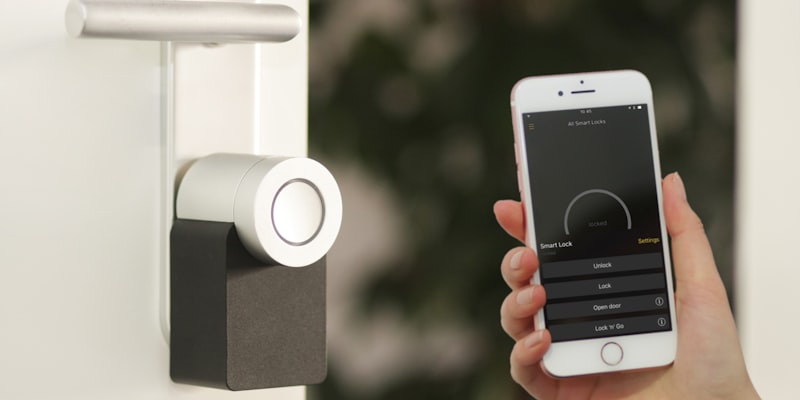
A smart lock unlocks the front door with a code, smartphone, or badge. This is particularly useful for a senior who regularly loses keys, or to allow a caregiver to enter at a set time without handing over a key set.
Suitable product: the August Wi-Fi Smart Lock (around $230) mounts on the existing lock in minutes without modifying the door. It is compatible with Alexa, Google, and Apple HomeKit. A keypad (around $60 extra) adds a code entry outside.
Important limitation: a smart lock runs on batteries (approximately 4 to 6 months of life). If the batteries die and no physical key is available, access is blocked. Always keep a traditional key as backup.
Water Leak Sensors
A leak sensor placed under the sink, near the washing machine, or by the water heater sends an instant alert to a family member’s phone if a leak occurs. This prevents water damage, which is common in older homes.
Suitable products: the Aqara Water Leak Sensor (around $18) is compact and very affordable, compatible with Alexa, Google, and Apple HomeKit via an Aqara hub (around $30). The Eve Water Guard (around $80) works on Thread without an additional hub but only with Apple HomeKit.
Motion Sensors and Activity Monitoring
Beyond automatic lighting, motion sensors can track activity in the home. If no movement is detected for an unusually long period (for example, no activity in the kitchen in the morning), an alert can be sent to a family member.
Practical use: a sensor in the kitchen and one in the bathroom allow remote verification that your parent has started their day, without cameras and without intrusion.
Three Budget Levels to Get Started
Starter Kit: Under $200
This kit covers the essentials: voice control and automatic lighting.
| Equipment | Approximate Price |
|---|---|
| Amazon Echo Pop (Alexa speaker) | $50 |
| 2 IKEA smart bulbs | $16 |
| 1 IKEA motion sensor | $10 |
| 1 smart plug (for table lamp) | $12 |
| Total | around $90 |
What it enables: turn lights on and off by voice, automate the hallway at night, ask Alexa questions, listen to the radio, set timers, call a family member hands-free.
Intermediate Kit: $200 to $500
This kit adds smart heating and basic security.
| Equipment | Approximate Price |
|---|---|
| Amazon Echo Show 8 (screen + Alexa) | $150 |
| Google Nest Thermostat | $130 |
| 3 Philips Hue White bulbs + Bridge | $80 |
| 1 Hue motion sensor | $40 |
| 1 Aqara leak sensor + hub | $48 |
| Total | around $450 |
What it adds: control heating remotely, see weather and video calls on the screen, detect water leaks, heating savings (around $200 per year).
Complete Kit: $500 to $1,500
This kit covers all the needs of a senior living alone.
| Equipment | Approximate Price |
|---|---|
| Amazon Echo Show 8 + Echo Pop (2 rooms) | $200 |
| Ecobee Smart Thermostat | $250 |
| Philips Hue lighting kit (5 bulbs + Bridge + 2 sensors) | $200 |
| August Smart Lock + Keypad | $290 |
| 2 Aqara leak sensors + hub | $65 |
| 2 Aqara door sensors | $28 |
| 1 smart blind motor | $180 |
| Total | around $1,210 |
What it adds: keyless entry for caregivers, automated blinds, activity monitoring via door sensors (alert if no opening in the morning), complete water security.
Which Ecosystem: Alexa, Google, or Apple?
The ecosystem choice determines which voice assistant controls the home. Here is an honest comparison for senior use.
Amazon Alexa (Echo)
Strengths: the largest number of compatible devices (over 300,000 references according to Amazon, 2025). Low entry price (Echo Pop from $50). Clear voice interface. “Drop In” feature to call a loved one without the senior having to answer.
Limitation: the Alexa app interface is complex and may confuse a less tech-savvy caregiver. Voice data passes through Amazon’s servers.
Best suited if you want the best compatibility-to-price ratio and if the senior is comfortable with simple voice commands.
Google Home (Nest)
Strengths: excellent natural language understanding. The Google Nest Hub (7-inch screen, around $100) displays weather, family photos, and video calls. Native YouTube integration for music and tutorials.
Limitation: slightly fewer compatible devices than Alexa. Google collects usage data for its advertising model.
Best suited if you want a central control screen in the living room and if the senior watches videos or listens to a lot of music.
Apple HomeKit (HomePod Mini)
Strengths: the most privacy-respecting (local command processing when possible, according to Apple). Perfect integration if the senior already owns an iPhone or iPad. The Thread protocol offers very stable connectivity.
Limitation: the HomePod Mini (around $99) has no screen. Fewer compatible devices than the other two. Higher overall cost. Siri is less capable than Alexa or Google for complex smart home commands.
Best suited if you prioritize privacy and if the senior already uses an iPhone.
Our Recommendation
For the majority of seniors, Amazon Alexa offers the best balance between ease of use, compatibility, and price. If privacy is a major concern and the senior is already in the Apple ecosystem, HomeKit is a solid but pricier choice.
How to Get Started: Step by Step
Step 1: Choose a Voice Assistant (Day 1)
Buy a single smart speaker. For a first setup, the Amazon Echo Pop ($50) or the Google Nest Hub 2 ($100 with screen) are the best choices. Plug in the speaker, download the app on a smartphone (yours or the senior’s), and follow the guided setup. Allow 10 to 15 minutes.
Show your parent the basic commands: “Alexa, what time is it?”, “Alexa, play NPR,” “Alexa, remind me to take my medication at 8 AM.”
Step 2: Add 2 or 3 Devices (Week 2)
After one to two weeks of getting used to the voice assistant, add the first devices. Start with what has the most daily impact:
- If the main risk is nighttime falls: a motion sensor + a smart bulb in the hallway
- If the heating bill is a concern: a smart thermostat
- If the senior loses their keys: a smart lock
Configure each device one at a time. Test with your parent. Do not move to the next one until the previous one is mastered.
Step 3: Automate (Month 2)
Once devices are installed, create simple automations:
- “At 10 PM, turn off all lights except the bedroom”
- “If motion in the hallway between 10 PM and 7 AM, turn on at 20% brightness”
- “At 7:30 AM, open the living room blinds”
These routines are configured in the assistant app (Alexa, Google Home, Apple Home) in minutes.
Step 4: Expand Gradually (Month 3 and Beyond)
Add security sensors (water leak, door sensors), then additional comfort devices based on identified needs. Each new device should solve a concrete problem, not satisfy a desire for technology.
Privacy and Security: Precautions to Take
Smart home technology involves personal data. Here are the points to check.
Voice assistants: Alexa and Google record voice commands. You can disable history in the app settings and regularly delete recordings. Activate the physical microphone mute button when the speaker is not in use.
Cameras: only install a camera if absolutely necessary and with the senior’s explicit consent. Prefer motion sensors (which transmit no images) over cameras.
Wi-Fi network: secure the home Wi-Fi with a strong password (minimum 12 characters, mix of letters, numbers, symbols). Regularly update the router and connected devices (automatic updates recommended).
Local protocols: devices running on Zigbee, Z-Wave, or Thread communicate locally without sending data to the internet. This is the most privacy-respecting option for sensors and lighting.
Testimonials: What Seniors and Their Families Say
Margaret, 78, using Alexa since 2024: “At first, my children set it up and I thought it was silly talking to a box. Now I couldn’t do without it. I ask for the weather, play the radio, and most importantly, the hallway light comes on by itself when I get up at night. It’s the first thing I recommend to my friends.” (Source: aging-in-place forum, November 2025.)
Robert, 72, full setup installed by his son: “My son meant well and installed everything at once: thermostat, bulbs, speaker, blinds. For two months, I didn’t touch anything because I was afraid of messing everything up. It was only when he came back and we went through each device one by one that I started using the system. My advice: take it slowly, one thing at a time.” (Source: senior tech forum, January 2026.)
Robert’s experience illustrates an essential point: even the best technology is useless if introduced too quickly. Patience and gradual implementation are the keys to successful adoption for a senior.
Editorial note
Sources consulted: AARP research on aging in place preferences (2023), US Department of Energy data on thermostat energy savings (2024), prices checked on amazon.com and manufacturer websites in April 2026, senior tech forums for user testimonials.
Limitations of this guide: prices listed are those observed in April 2026 and may vary by retailer and promotions. Installation of certain equipment (blind motorization, smart lock) may require professional help depending on the home configuration. We have not personally tested all products mentioned. Energy savings depend heavily on home insulation and heating habits.
Verification date: April 16, 2026.
Conflicts of interest: this guide contains affiliate links to Amazon. Editorial recommendations are not influenced by these partnerships. No smart home equipment manufacturer funded this guide.
Questions fréquentes
-
No. Current starter kits (Amazon Echo, Google Nest) can be configured in under 15 minutes using a smartphone app. Smart bulbs screw in like regular bulbs, and sensors attach with adhesive strips. No wiring or construction work is needed for wireless solutions. The key is to start with one or two devices and add more gradually.
-
An effective starter kit costs between 100 and 200 dollars. For example, an Amazon Echo Pop (around $50) and two smart bulbs (around $25) are enough to control lighting by voice. Adding a motion sensor (around $35) automates lights without any intervention.
-
Yes. Most smart devices (voice assistants, thermostats, sensors) require an active Wi-Fi connection. Some local automations (Zigbee bulbs via a bridge) work without internet once configured, but voice commands and remote alerts require a connection. A basic broadband connection is sufficient for home automation.
-
For a senior, Amazon Alexa is generally the simplest choice: widest device compatibility, low entry price (Echo Pop from $50), intuitive voice interface. Google Home is equally easy to use with a slight advantage for internet searches. Apple HomeKit is more privacy-focused but more expensive and compatible with fewer devices. The main criterion is simplicity of daily use.
-
In many countries, government programs support home adaptations for seniors. In France, MaPrimeAdapt covers 50 to 70% of home adaptation costs. In the US, some state programs and Medicaid waivers cover assistive technology. Check with your local aging services agency for available support in your area.
-
It depends on the choices made during setup. Voice assistants (Alexa, Google) record voice commands on remote servers, but you can disable history and delete recordings. Motion and door sensors only transmit presence data, not images. For maximum privacy, choose local solutions (Zigbee, Thread) that work without cloud, and avoid cameras unless absolutely necessary.